How to add store item and activate in outlets in POS
What is the store Item?
Menu Item is prepared by store items which are purchasing from vendors.
Example: Store item>> Breads, Mayonnaise Sauce, Tomato, Onion etc. for menu item
Location:
eZee Optimus >> Switch to back >> Inventory >> Store Item
Prerequisite:
Before adding Store Items, you need to add the Storage Area(optional), all the units of measure(mandatory) i,e Grams, KG, Bag etc as well as all the store item categories.
eZee Optimus >> Switch to back >> Inventory >> Storage Area
eZee Optimus >> Switch to back >> Inventory >> Unit
eZee Optimus >> Switch to back >> Inventory >> Item category
How to Access:
Follow below steps to add store item
Step 1: Enter Name, Item Category, Base Unit & Item Type Mandatory Information
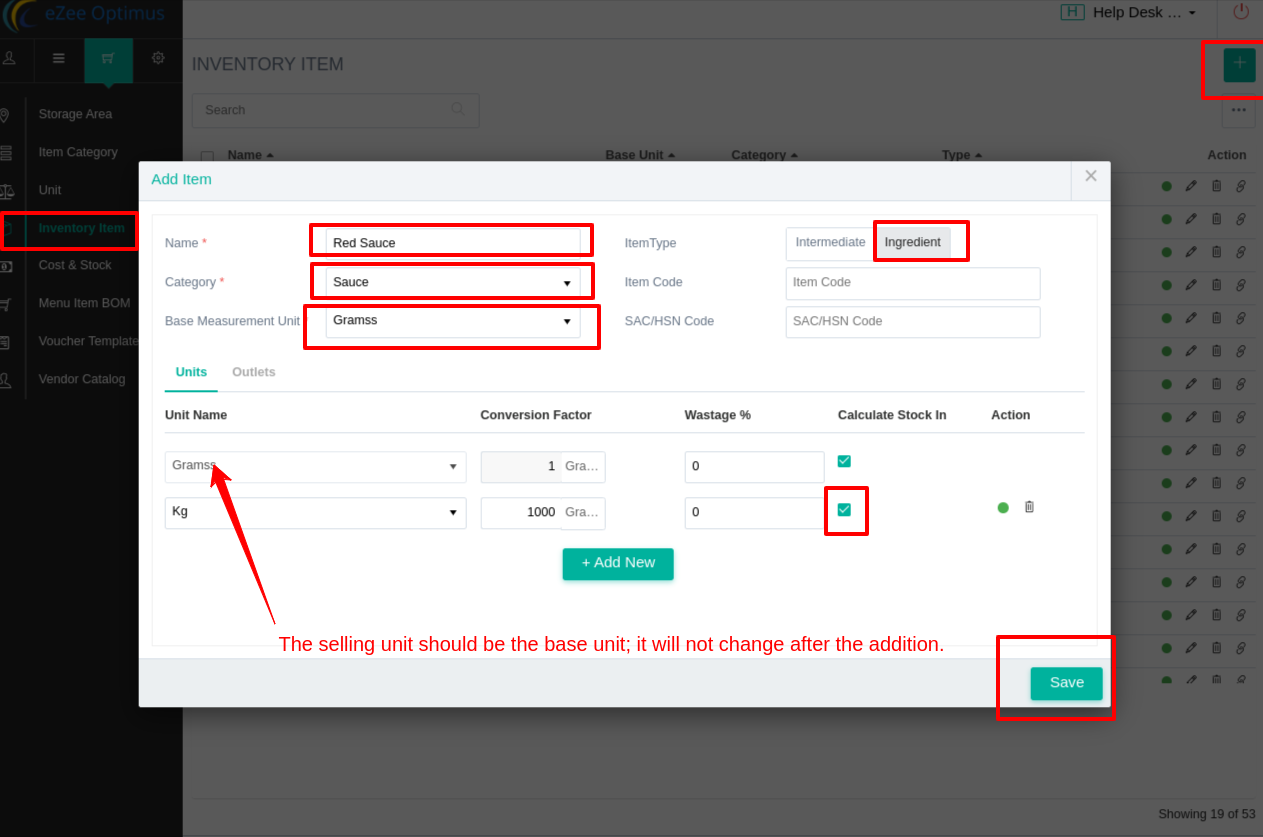
Step 2: Active store item in the outlet's store area (Mandatory for one store)
You can add multiple store here
Steps to import Store item
- Get import file format


2. Add data in xls sheet.

3. Once data is added in Xls sheet, you can save the file and import it as per given screen shot.

Related Articles
How to add menu item BOM( Bill of material/ Inventory Consumption) in POS
What is menu item BOM - Inventory Consumption? When we punch menu item in the outlet, our store item got reduce to make item. Set menu item BOM to manage inventory consumption. Example, Sell a sandwich from POS so we will add sandwich's ingredients ...How To Add An Intermediate Item And What Is A Manufacturing Item
What is an Intermediate Item? An intermediate item is made with other 2-3 store items. It is made in-store by using different inventory ( raw materials ) from the Store. Example: Added item “Tomato Sauce” made with Tomato, Black Salt, Mustard oil, ...How To Check Menu Item Consumption Or Store Item Deduction Report In POS
To check inventory items consumption, kindly refer to menu item consumption reports. 1. Go to the Reports Section. 2. Check the Menu item consumption report. Select the date and select the outlet. Select the cost calculation method to see the value ...How to add session(i.e Happy Hour) and set session rate in POS?
What is Session, Happy Hours, or Cocktail Hours? POS offers discounts in a period of time or season called Happy hour. It can be unlimited food offers, Combo Offers, Free Drinks, discounted menu items, Weekend Offers, etc. Location: eZee Optimus >> ...How to Add Vendors/Suppliers
The vendor catalog is a list of goods available from different vendors. An accurate and complete vendor catalog can make it easier to keep items in stock at the best possible price. You can link multiple vendor catalog items to a single product ...